Black and White Photography Tips: How to Master Contrast and Texture
Strong black and white photos start before you convert them. Learn to recognize promising light and shapes, capture useful color information, and edit with control.
Key takeaways
- Look for light, tonal separation, shape and texture, not just subjects that seem dramatic in color.
- Shoot RAW when possible, and check how your camera handles monochrome previews and filter effects.
- Use channel controls in a black and white conversion to adjust how original colors translate into gray.
- Dodge and burn selectively to guide attention while preserving natural-looking tonal transitions.
- Choose subjects with clear form, strong light or meaningful texture, then simplify the frame.
In this guide
Black and white photography can make a familiar scene feel graphic, quiet or full of texture. But removing color does not automatically make a picture stronger. You need to notice how colors will translate into gray and how light separates your subject from its surroundings.
This guide shows you how to spot monochrome opportunities, capture files that give you room to edit, and build contrast without losing important detail. You will also learn which subjects tend to work well and how to avoid common conversion problems.
Learn to see in monochrome
Start by looking past a scene’s colors. Ask whether its subject will still stand out if the colors disappear. A red flower against green leaves may look vivid in color but nearly merge into the same gray tone; a pale flower against a dark wall may have clearer separation.
Look for differences in brightness, not only differences in hue. Notice where the brightest and darkest areas fall, whether the main subject has a distinct outline, and how the eye might move through the frame. Squinting briefly can help you simplify the scene into large areas of light and dark.
Many cameras and phones offer a monochrome preview or picture style. It can help you judge composition in the field, but check your camera’s RAW behavior: on many color cameras, the RAW file still records color data while the monochrome setting affects the preview or JPEG. Some dedicated monochrome cameras work differently.
Try composing the same scene in both color and monochrome preview. Look for changes in separation, background clutter and emphasis. If the subject disappears in the preview, change your angle, wait for different light or find a background with a more distinct tone.
Pro tip: Take a quick monochrome preview shot, then review it at a distance or as a small thumbnail. Weak tonal separation is often easier to spot when you are not distracted by color.
Use light and contrast deliberately
Light gives a black and white image its structure. Low-angle sunlight can create long shadows and reveal surface detail, while overcast light often softens contrast and makes it easier to keep detail in bright and dark areas. Neither is automatically better. Choose the light that supports the mood and subject.
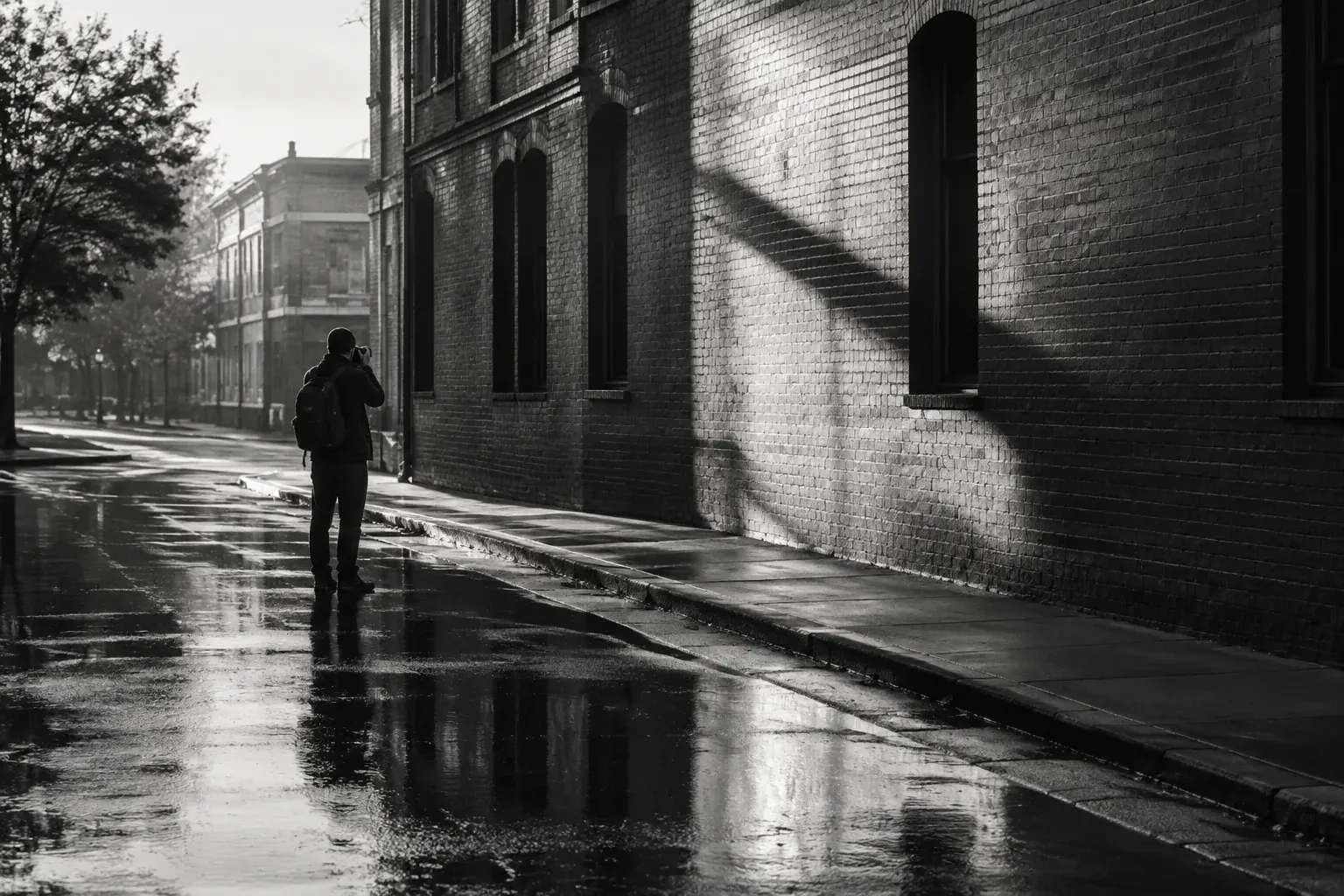
Side lighting is useful when you want texture: it creates small highlights and shadows across bark, stone, fabric or a face. Front lighting tends to flatten those surfaces. Backlighting can create a clean silhouette, but make sure the outline reads clearly and does not blend into nearby shapes.
High contrast can make a photograph feel bold, but it can also erase information. In a scene with bright sky and dark buildings, decide which highlights matter and which shadows need detail. Expose carefully to avoid clipping important highlights, and check the histogram or highlight warning if your camera provides one. A RAW file may allow some highlight recovery, but it cannot restore detail that was not recorded.
Contrast is not just a global editing slider. It comes from the difference between nearby tones, the direction of light, the brightness of the background and the placement of objects. A dark subject against a light background can read clearly even when the overall photograph has gentle contrast.
Build pictures from texture, shape and space
Texture gives the eye something to explore, but a frame full of detail can become busy. Use texture to support the subject, then look for a simple shape or pattern that gives the viewer a place to start. Repeating windows, a winding road, a row of trees or one bright shape against a dark field can all create a strong structure.
Pay attention to edges and negative space, the quieter area around your subject. A clean gap between two forms can make them easier to read. Move a few steps, change your height or shift the subject within the frame to separate overlapping shapes.
A black and white image can also rely on tonal layers: a foreground, middle ground and background that each occupy a different range of gray. In a landscape, haze may make distant hills lighter and lower in contrast. In a city, a bright wall can separate a person from a dark doorway. These layers give the frame depth without color.
Before taking the photo, check the corners and background. Bright objects near the edge can pull attention away from the main subject, and small branches or poles can appear to grow out of a person or building. Simplifying the frame is often more effective than trying to fix every distraction later.
Capture choices: RAW, exposure and color filters
If your camera supports RAW, use it when you expect to make a careful conversion. RAW files preserve more flexible color information than a finished JPEG, which helps when you adjust tonal relationships later. They also take more storage and require processing. If you want a ready-to-share file, capture RAW plus JPEG if your camera allows it.
Use a low ISO when practical, but do not let a sharpness goal make you miss the moment. Choose a shutter speed that controls subject or camera movement, then set the aperture for the depth of field you want. For handheld scenes, stabilization can help with camera shake, but it will not freeze a moving subject.
A color filter changes how different wavelengths reach the camera or film. In traditional black and white film photography, this can make some colors lighter and others darker in the final image. Digital converters offer a more flexible equivalent through color channel controls, often labeled as a monochrome mix or black and white mix.
| Color or control | Common tonal effect in a monochrome conversion | When to try it |
|---|---|---|
| Yellow filter or yellow channel | Often gives a modest darkening of blue skies and slight separation in clouds | For a restrained landscape effect |
| Orange filter or orange channel | Usually darkens blue more strongly and can separate warm surfaces | For more pronounced skies or warm-toned subjects |
| Red filter or red channel | Can make blue skies much darker and reduce some haze, while changing how skin and foliage render | For a bold, graphic look; check the whole frame |
| Green filter or green channel | Can lighten many greens and change the separation of foliage and skin | For vegetation or portraits when the result suits the subject |
These are tendencies, not guarantees. The result depends on the original colors, lighting, camera and conversion method. A colored physical filter can be useful with film or when you want an effect at capture, but with a color digital camera it can also reduce light or introduce a cast. For most RAW workflows, adjusting channels during conversion is easier to fine-tune.
Good to know: A monochrome preview can make a color camera’s histogram look different from the RAW data. When highlight detail matters, check the camera’s exposure warnings and, if available, the separate red, green and blue histograms.
Follow a repeatable conversion and editing workflow
A consistent order keeps editing easier to judge. Start with the whole image, then make local adjustments. Work on a duplicate or virtual copy if your software supports it, so you can return to the color original or compare alternate conversions.
- Choose the conversion. Switch to a black and white profile or conversion tool. Do not assume a simple desaturation will give the best result; it removes color without letting you control how each color becomes gray.
- Adjust the color mix. Move the channel controls gradually. Watch the subject and background together, especially if they share similar colors. Stop if a channel adjustment creates harsh edges, blotchy tones or unnatural-looking skin.
- Set the tonal range. Adjust exposure, white point and black point with care. Preserve detail in important highlights and shadows rather than forcing every image to pure white and black. A low-contrast image may be the right choice for mist, soft light or a quiet mood.
- Shape local contrast. Use modest contrast or clarity adjustments where they help the subject. Strong global settings can make skies, skin and smooth surfaces look harsh, so inspect the entire frame at normal viewing size.
- Dodge and burn. Dodging lightens a selected area; burning darkens it. Use a soft brush or gradual mask at low strength to guide attention, even out distracting brightness or bring out form. Build the effect in small passes and compare with the unedited image.
- Finish and check. Apply sharpening with the intended output in mind, and avoid adding so much grain that fine details become muddy. Review the image at both fit-to-screen and close-up sizes, then export a version suited to the place you will share or print it.
Dodge and burn should support the photograph, not announce themselves. A subtle lift to a face or a slight darkening of a bright corner may be enough. If an area looks painted, has a visible halo or has lost its natural texture, reduce the adjustment.
If you plan to print, review a proof when possible. A print can appear darker or have different shadow detail than a bright monitor, and paper choice affects the result. Check the print under ordinary viewing light before making large changes to the file.
Choose subjects that suit black and white
Subjects tend to work well when they have clear form, distinct tonal separation, strong texture or a recognizable pattern. Architecture, weathered surfaces, dramatic skies, portraits, still lifes and street scenes can all be good candidates. The subject alone is not enough; the light and background still need to help the image read.
Portraits benefit from attention to expression, light and background. Check how skin, hair and clothing separate after conversion, especially when clothing and skin have similar brightness. For wildlife, look for a clear outline and a background that does not compete with the animal. Wildlife Photography Tips: How to Capture Captivating Animal Images offers useful guidance on anticipating behavior and composing around an animal.
Landscape photographers can use clouds, ridgelines, water and shadow to create tonal layers. Fog and overcast conditions may produce a softer range, while direct sun can create strong graphic shapes. For cold-weather outings, plan for battery performance and changing light with these winter wildlife photography tips.
Try still life when you want time to control the setup. Place objects against a contrasting background, move a light source to reveal texture, and remove anything that does not add shape or meaning. A simple arrangement often converts better than a colorful but crowded one.
Common mistakes to avoid
- Assuming a dramatic color scene will work in monochrome: Check brightness separation. If adjacent colors become the same gray, adjust your position or use channel controls.
- Raising contrast until detail disappears: Watch faces, skies and dark clothing. Keep texture where it matters, and accept that not every shadow needs to be black.
- Using clarity or sharpening everywhere: These controls can exaggerate noise and make smooth areas look rough. Apply them selectively and inspect the result at actual viewing size.
- Relying on auto conversion: Automatic settings are a starting point, not a decision about what deserves emphasis. Adjust the mix and tonal range for the specific scene.
- Overdoing dodge and burn: Large or strong local adjustments can create halos and uneven tones. Use gradual changes and compare often with the original.
- Ignoring the background: A clean subject can disappear against a similarly toned wall, tree or patch of sky. Check the frame edges and separate overlapping forms before shooting.
The Bottom Line
Mastering black and white photography begins with seeing brightness, shape and texture before you press the shutter. Look for light that separates your subject, keep distractions out of the frame and capture RAW files when you want more control over conversion.
In editing, use channel mixing to make deliberate tonal choices, then refine contrast and guide the eye with restrained dodging and burning. The strongest result is not always the starkest one; it is the version that makes the subject clear and the image feel intentional.
Frequently asked questions
Should I shoot black and white photos in RAW or JPEG?
Shoot RAW if you want the most flexibility when adjusting the conversion, especially the effect of original colors on gray tones. RAW plus JPEG can give you both an editable file and a ready-to-share monochrome image. Check how your camera applies monochrome settings to RAW files.
How do I make a blue sky darker in a black and white photo?
In a RAW converter, lower the blue channel in the monochrome mix gradually and watch the sky and clouds. A physical red or orange filter can also darken blue skies, particularly with black and white film, but effects depend on the scene and equipment.
What makes a good subject for black and white photography?
Look for clear shapes, useful tonal separation, texture, patterns or expressive light. Architecture, portraits, landscapes, still lifes and wildlife can all work when the subject stands apart from its background.
Is desaturating a color photo enough to make it black and white?
Desaturation can make a basic monochrome image, but it does not give you direct control over how each original color becomes gray. A black and white mix lets you adjust channels, which can improve separation between a subject and its surroundings.
What do dodging and burning mean in photography?
Dodging lightens selected parts of an image, while burning darkens them. Use subtle, gradual adjustments to guide attention or balance a frame, and reduce them if they create halos or an obviously uneven look.